

Break statement and Continue in Matlab1.- Break2.- Continue 3.- Video Summary 1.- The break StatementThe break statement lets you exit early from a for or while loop. In nestedloops, break exits from the innermost loop only. It is part of the flow control in programming. Example 1: % Let's say that you have an array that you want to explore y = [-2 -4 0 -4 3 7]; % You're gonna test each element for a special condition for i = 1 : length(y) % Test for a greater-than-zero value if y(i) > 0 % terminate loop execution break end % If it does not meet your condition, you can follow with your code z = y(i) + 6; disp(z) end The result is that the operation affects only the first four elements of the array; the fifth element makes the for-loop end. Matlab shows:  Example 2: % This could be anything previous to your break x = 10; % This loop should go on forever while 1 % Let's say that you want to validate an input from the user n = input('Enter number of loops: '); % If the input is inappropriate if n <= 0 % terminate the loop execution break end % If the answer is ok for i = 1 : n % follow your code, do whatever you need with your input x = x + 10 end end The code goes on until the input is 0 or less. This is the result: 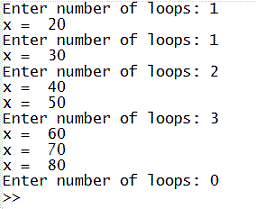 2.- The continue StatementThe continue statement temporarily interrupts the execution of a program loop, skipping any remaining statements in the body of the loop for the current pass. It continues within the loop for as long as the stated for or while condition remains true.Example 3: % Let's assume that you are verifying a set of values for i = 1 : 7 % You can do something to disregard a few elements if (i == 2 | i == 5) continue end % Otherwise, you can operate on the remaining values disp(i) end The code above operates only on 5 elements of the array. This is the result... 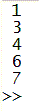 3.- Video SummaryFrom 'break statement' to home From 'break statement' to 'Matlab Code - Flow Control'
|
