logo for matrixlab-examples.com
[?] Subscribe To This Site

XML RSS
Add to Google
Add to My Yahoo!
Add to My MSN
Subscribe with Bloglines


Home
Matrixmania Blog
Contact
-> Sitemap <-
Matlab Books
Quick Matlab Guide
Matlab Tutorials
Matlab Examples
Matlab Flow Control
Boolean Algebra
Linear Algebra
Matlab 2D Plots
Matlab 3D Plots
Matlab GUI
Matlab Cookbook I
Matlab Cookbook II
Probability and Stats
Forums and Help
Relevant Links
Fun!
Your own Website?
Terms/Policies
leftimage for matrixlab-examples.com

Numerical Derivative


We are going to develop a Matlab function to calculate the numerical derivative of any unidimensional scalar function fun(x) at a point x0. The function is going to have the following functionality:

Usage:    D = Deriv(fun, x0)
          fun: name of the unidimensional scalar function
          (string)

          x0: point of interest (scalar)
          D: derivative of fun at x0 (scalar)


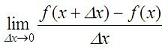
As you may remember, the very well known way to analytically derivate any function is:

formula for derivatives

This roughly means that we have to find the value of the function in two very close values (one of them is the point of interest), get the difference of those values and divide it by the displacement of the independent variable. In other words,

First step:
Find functions for derivatives, where delta x is a very small value compared to x.

Second step:
Obtain the difference function difference for derivatives.


Third step:

Divide the result above by delta x.


The result is the numerical derivative of your function.

We can implement this algorithm very easily in Matlab, in this way:

function D = Deriv(fun, x0)
% |delta| is relative to |x0|
delta = x0 / 1000;       
if x0 == 0
  % avoids delta = 0 (**arbitrary value**)
  delta = 1e-12;       
end
f1 = feval ( fun, x0 + delta );
f2 = feval ( fun, x0 - delta );
D = (f1 - f2) / (2 * delta);

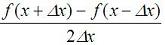
Note, that we are really evaluating

algorithm for derivative

which should be the same as explained above, since the displacement is almost zero. You can try both options. 

Function 'feval' evaluates a given function (the string in the parameter fun) in a specific value (number in second parameter of 'feval').

Now, let's try our derivative function. We create a function in a separate m-file:

function y = inverse(x)
y = 1/x;

And we can call it like this:

Deriv('inverse', 1)

The result is: 
Expected:     -1    Obtained:    -1.0000

Deriv('inverse', 5)

The result is:
Expected:     -0.04    Obtained:    -0.0400

We can save another totally arbitrary (unidimensional scalar) function in a different m-file:

function y = myfun(x)
y = 3*x^2 + 2*x;

And we can perform the derivative in several ways...

f = 'myfun'
x = 0
Deriv(f, x)

The result is: 
Expected:     2    Obtained:     2

x = 5
Deriv(f, x)
The result is: 
Expected:     32    Obtained:    32.0000

Deriv(f, -3)
The result is: 
Expected:    -16    Obtained:     -16.0000

From 'Derivative' to home
From 'Derivative' to 'Matlab Cookbook'

footer for derivative page