logo for matrixlab-examples.com
[?] Subscribe To This Site

XML RSS
Add to Google
Add to My Yahoo!
Add to My MSN
Subscribe with Bloglines


Home
Welcome Matrixmania Blog
-> Sitemap / Search <-
-> Books <-
Forums and Help
Contact
Basics Quick Matlab Guide
Matlab Tutorial
Matlab Examples
Matlab Flow Control
Boolean Logic
Plots and GUI Matlab 2D Plots
Matlab 3D Plots
Matlab GUI
Applications Calculus
Linear Algebra
Matlab Cookbook I
Matlab Cookbook II
Electrical Calculations
Probability and Stats
Finance Apps
Other Relevant Links
Notes on Computing
Online Calculators
Fun!
Your own Website?
Terms/Policies
leftimage for matrixlab-examples.com

Determinants in Matlab

The determinant (in linear algebra) is a value associated with a square matrix, that is a matrix with as many rows as columns. It can be calculated from the elements of the matrix by a specific arithmetic expression. The determinant provides important information in many types of problems, for example, when the matrix represent the coefficients of a system of linear equations... 


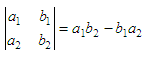
The symbol

determinant symbol

which consists of the four numbers a1, b1, a2, b2 arranged in two rows and two columns is called a determinant of second order or of order two. The four numbers are called its elements. By definition,

determinant of second order solved 

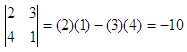
Then,  example of a determinant   

Here, the elements 2 and 3 are in the first row, and the elements 4 and 1 are in the second row. Elements 2 and 4 are in column one, and elements 3 and 1 are column two.

The method of solution of linear equations by determinants is called the Cramer’s Rule. A system of two linear equations in two unknowns may be solved using a second order det. Given the system of equations 

a1x + b1y = c1
a2x + b2y = c2

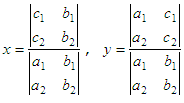
it is possible to obtain

solution for x and y

These values for x and y may be written in terms of second order dets, as follows:

 x and y solved with determinants

Example: 


Solve the system of equations:

2x + 3y = 16
4x + y = -3

The denominator for both x and y isexample of a determinant


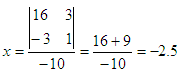
Then
solution for x

and
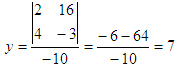
solution for y

In Matlab, a determinant can be calculated with the built-in function 'det()'.

Using the same numbers as in the example above,

if A = [2 3; 4 1], then det(A) = -10;
if B = [16 3; -3 1], then x = det(A)/det(B) = -2.5;
if C = [2 16; 4 -3], then y = det(C)/det(A) = 7

Naturally, you can use the function det() to find determinants of higher order.  


Cramer's Rule  Simultaneous equations

From 'determinants' to home

From 'determinants' to 'Linear Algebra'


footer for determinants page