logo for matrixlab-examples.com
[?] Subscribe To This Site

XML RSS
Add to Google
Add to My Yahoo!
Add to My MSN
Subscribe with Bloglines


Home
Welcome Matrixmania Blog
-> Sitemap / Search <-
-> Books <-
Forums and Help
Contact
Basics Quick Matlab Guide
Matlab Tutorial
Matlab Examples
Matlab Flow Control
Boolean Logic
Plots and GUI Matlab 2D Plots
Matlab 3D Plots
Matlab GUI
Applications Calculus
Linear Algebra
Matlab Cookbook I
Matlab Cookbook II
Electrical Calculations
Probability and Stats
Finance Apps
Other Relevant Links
Notes on Computing
Online Calculators
Fun!
Your own Website?
Terms/Policies
leftimage for matrixlab-examples.com

Gaussian distribution – how to plot it in Matlab


In statistics and probability theory, the Gaussian distribution is a continuous distribution that gives a good description of data that cluster around a mean. The graph or plot of the associated probability density has a peak at the mean, and is known as the Gaussian function or bell curve.


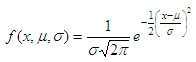
The Probability Density Function (PDF) in this case can be defined as:


Gaussian distribution formula

where 

relevant values in bell curve


The formula above can me coded in Matlab easily, like this: 

function f = gauss_distribution(x, mu, s)
p1 = -.5 * ((x - mu)/s) .^ 2;
p2 = (s * sqrt(2*pi));
f = exp(p1) ./ p2;
 

Now, let’s use it in an example. 

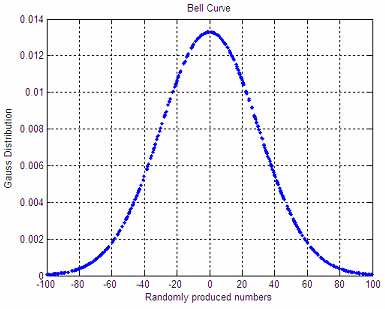
We produce 500 random numbers between -100 and 100, with mean m = 0 and standard deviation s = 30. The code is: 

a = -100; b = 100;
x = a + (b-a) * rand(1, 500);
m = (a + b)/2;
s = 30;
 

Then, we plot this information using our bell curve: 

f = gauss_distribution(x, m, s);
plot(x,f,
'.')
grid
on
title('Bell Curve')
xlabel(
'Randomly produced numbers')
ylabel(
'Gauss Distribution') 

The produced shape is:

Gaussian distribution after random numbers 

An important property of this bell-shaped curve is that the values less than one standard deviation from the mean (between green lines below) represent approximately 68.2% of the area under the curve, while two standard deviations from the mean (between red lines below) take about 95.4%, and three standard deviations account for about 99.7% of the area.
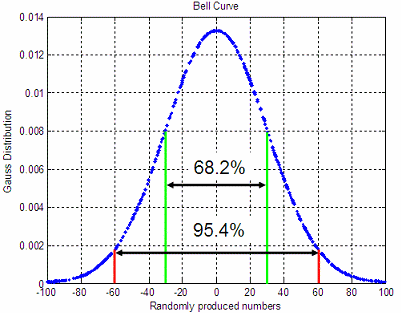
 

standard deviation values in a bell curve

 From 'Gaussian distribution' to home

 From 'Gaussian distribution' to Matlab 2D plots

 Probability and Statistics
 
Statistics: Normal Distribution

Top


footer for gaussian distribution page