logo for matrixlab-examples.com
[?] Subscribe To This Site

XML RSS
Add to Google
Add to My Yahoo!
Add to My MSN
Subscribe with Bloglines


Home
Welcome Matrixmania Blog
-> Sitemap / Search <-
-> Books <-
Forums and Help
Contact
Basics Quick Matlab Guide
Matlab Tutorial
Matlab Examples
Matlab Flow Control
Boolean Logic
Plots and GUI Matlab 2D Plots
Matlab 3D Plots
Matlab GUI
Applications Calculus
Linear Algebra
Matlab Cookbook I
Matlab Cookbook II
Electrical Calculations
Probability and Stats
Finance Apps
Other Relevant Links
Notes on Computing
Online Calculators
Fun!
Your own Website?
Terms/Policies
leftimage for matrixlab-examples.com

Logical AND


We're going to examine a couple of examples on boolean operators in Matlab. These operators are useful when we want to develop logic functions in our code. Naturally, we can combine several operations do accomplish very complex functions. Let's start with the basics...

A & B performs a logical AND of arrays A and B and returns an array containing elements set to either logical 1 (TRUE) or logical 0 (FALSE).


A    B    A & B
0    0      0
0    1      0
1    0      0
1    1      1
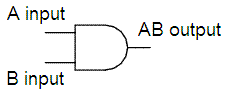
logical AND gate - example Matlab
This is a logical AND Gate, as used in electronic circuits


An element of the output array is set to 1 if both input arrays contain a non-zero element at that same array location. Otherwise, that element is set to 0.  A and B must have the same dimensions unless one is a scalar. 
 
Example:

If matrix A is:
A =

     0     0     1     1
     1     1     0     0
     0     0     0     0
     1     1     1     1

and matrix B is:
B =

     0     0     0     0
     1     1     1     1
     0     1     0     1
     1     0     1     0

Then, the AND operation between A and B is:

>> A & B

ans =

     0     0     0     0
     1     1     0     0
     0     0     0     0
     1     0     1     0

>>


Example:

If vector x is:
x =

     0     1     2     3     0

and vector y is:
y =

     1     2     3     0     0

Then, the AND operation between x and y is:
>> x & y

ans =

     0     1     1     0     0


 From 'Logical AND' to home
 From 'Logical AND' to 'Boolean Algebra'
   
Top

Logical OR

Logical XOR

Logical NOT

Boolean Axioms


footer for matlab page