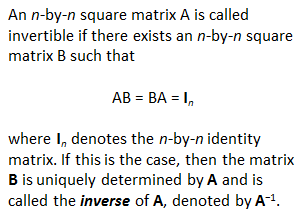
Matrix Inversion
perform exactly the same operations on the accompanying identity matrix in order to obtain the inverse one. If we find a row full of zeros during this process, then we can conclude that the matrix is singular, and so cannot be inverted. We're exposing a very naive method, just as was performed in the old-Basic- style. Naturally, Matlab has appropriate and fast instructions to perform matrix inversions (as with 'inv' or '\', for example), but we want to explain the Gauss-Jordan concept and show how nested loops and control flow work. First, we develop a function like this (let's assume we save it as 'mat_inv2.m'): function b = mat_inv2(a) % Find dimensions of input matrix [r,c] = size(a); % If input matrix is not square, stop function if r ~= c disp('Only Square Matrices, please') b = []; return end % Target identity matrix to be transformed into the output % inverse matrix b = eye(r); %The following code actually performs the matrix inversion by working % on each element of the input for j = 1 : r for i = j : r if a(i,j) ~= 0 for k = 1 : r s = a(j,k); a(j,k) = a(i,k); a(i,k) = s; s = b(j,k); b(j,k) = b(i,k); b(i,k) = s; end t = 1/a(j,j); for k = 1 : r a(j,k) = t * a(j,k); b(j,k) = t * b(j,k); end for L = 1 : r if L ~= j t = -a(L,j); for k = 1 : r a(L,k) = a(L,k) + t * a(j,k); b(L,k) = b(L,k) + t * b(j,k); end end end end break end % Display warning if a row full of zeros is found if a(i,j) == 0 disp('Warning: Singular Matrix') b = 'error'; return end end % Show the evolution of the input matrix, so that we can % confirm that it became an identity matrix. a And then, we can call it or test it from any other script or from the command window, like this: % Input matrix a = [3 5 -1 -4 1 4 -.7 -3 0 -2 0 1 -2 6 0 .3]; % Call the function to find its inverse b = mat_inv2(a) % Compare with a result generated by Matlab c = inv(a) Matlab produces this response: First, we see how the original matrix was transformed into an identity matrix: a = 1 0 0 0 0 1 0 0 0 0 1 0 0 0 0 1 Then, our function shows its result: b = 0.6544 -0.9348 -0.1912 0.0142 0.1983 -0.2833 -0.1034 0.1558 0.3683 -1.9547 -4.2635 -0.4249 0.3966 -0.5666 0.7932 0.3116 Finally, this is the inversion produced by an instruction from Matlab (inv(a)): c = 0.6544 -0.9348 -0.1912 0.0142 0.1983 -0.2833 -0.1034 0.1558 0.3683 -1.9547 -4.2635 -0.4249 0.3966 -0.5666 0.7932 0.3116 Another example: % Input matrix a = [1 1 1 1]; % Call the function to find its inverse b = mat_inv2(a) % Compare with a result generated by Matlab c = inv(a) And Matlab display is: Warning: Singular Matrix b = error Warning: Matrix is singular to working precision. > In test_mat_inv at 42 c = Inf Inf Inf Inf In this case, our algorithm found a singular matrix, so an inverse cannot be calculated. This agrees with what Matlab found with its own built-in function. If you are interested in a Modified Gauss-Jordan Algorithm, you can see this article. From 'Matrix Inversion' to home From 'Matrix Inversion' to 'Linear Algebra' Examples on Flow Control
|