logo for matrixlab-examples.com
[?] Subscribe To This Site

XML RSS
Add to Google
Add to My Yahoo!
Add to My MSN
Subscribe with Bloglines


Home
Matrixmania Blog
Contact
-> Sitemap <-
Matlab Books
Quick Matlab Guide
Matlab Tutorials
Matlab Examples
Matlab Flow Control
Boolean Algebra
Linear Algebra
Matlab 2D Plots
Matlab 3D Plots
Matlab GUI
Matlab Cookbook I
Matlab Cookbook II
Probability and Stats
Financial Applications
Forums and Help
Relevant Links
Fun!
Your own Website?
Terms/Policies
leftimage for matrixlab-examples.com

MS Excel and Matlab (interchanging data)


In this article we'll show how to interchange information between MS Excel and Mathworks' Matlab, working from a Matlab m-file.

There are two handy Matlab instructions for this purpose: xlsread and xlswrite.


Common format for xlsread (read an xls-file):

[num, txt] = xlsread(file, sheet, range)

Where
file = name of xls file (string)
sheet = name of specific sheet within the file (string)
range = specific range to read (string)
num = read numerical data (numeric array or matrix)
txt = read text data (cell array)

Common format for xlswrite (to write an xls.file):

xlswrite(file, m, sheet, range)

Where
m = matrix to insert in xls file
file, sheet and range are as before

An example...

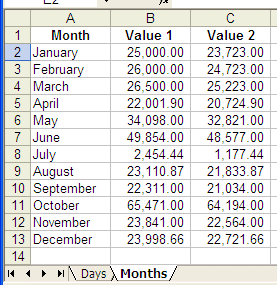
Let's say that we have an Excel file named 'ex2mat.xls' that includes two sheets named 'Days' and 'Months'.

Here's the data for those sheets:
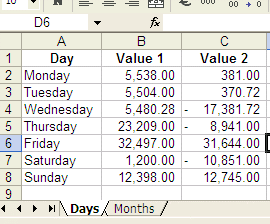
Excel data to be read by Matlab


Excel to Matlab example

We start by setting-up our environment (we assume that the MS Excel .xls file is in the same directory as our Matlab files, otherwise we should take care of the full path for the file under test):

file = 'ex2mat.xls';
sheet1 =
'Days';
sheet2 =
'Months';

We read relevant information: 

[numbers, text] = xlsread(file, sheet1, 'a1:c8')

And we get:

numbers =
  1.0e+004 *
    0.5538    0.0381
    0.5504    0.0371
    0.5480   -1.7382
    2.3209   -0.8941
    3.2497    3.1644
    0.1200   -1.0851
    1.2398    1.2745

text =
    'Day'          'Value 1 '    'Value 2'
    'Monday'               ''           ''
    'Tuesday'              ''           ''
    'Wednesday'            ''           ''
    'Thursday'             ''           ''
    'Friday'               ''           ''
    'Saturday'             ''           ''
    'Sunday'               ''           ''

Note that 'text' is a cell array, without numbers.

We can manipulate data and insert the results back in the file (the file must be closed in advance, otherwise Matlab won't update it):


m = mean(numbers)
xlswrite(file, m, sheet1, 'b9:c9')

[numbers, text] = xlsread(file, sheet1, 'a5:c5')
m = m + numbers;
xlswrite(file, m, sheet1,
'b10:c10'

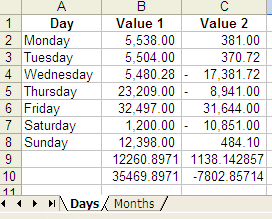
The final result is:

Results to Excel after manipulation by Matlab

We can read the other sheet from the file, like this: 

[n1, txt1] = xlsread(file, sheet2, 'a1:c13')
[n2, txt2] = xlsread(file, sheet2,
'a2:c2')

And the results are:

n1 =
  1.0e+004 *
    2.5000    2.3723
    2.6000    2.4723
    2.6500    2.5223
    2.2002    2.0725
    3.4098    3.2821
    4.9854    4.8577
    0.2454    0.1177
    2.3111    2.1834
    2.2311    2.1034
    6.5471    6.4194
    2.3841    2.2564
    2.3999    2.2722

txt1 =
    'Month'        'Value 1 '    'Value 2'
    'January'              ''           ''
    'February'             ''           ''
    'March'                ''           ''
    'April'                ''           ''
    'May'                  ''           ''
    'June'                 ''           ''
    'July'                 ''           ''
    'August'               ''           ''
    'September'            ''           ''
    'October'              ''           ''
    'November'             ''           ''
    'December'             ''           ''

n2 =
       25000       23723
txt2 =
    'January'

From 'MS Excel' to home
From 'MS Excel' to 'Matlab Programming'


footer for ms-excel and Matlab page