Piecewise function - separate ranges in MatlabIn math, a piecewise function (or piecewise-defined function) is a function whose definition changes depending on the value of the independent variable.
We’re going to experiment in Matlab with this type of functions. We’re going to develop three ways to define and graph them. The first method involves if-statements to classify element-by-element, in a vector. The second method uses switch-case statements, and the third method uses indices to define different sections of the domain. Let’s say that this is
our piecewise-defined function 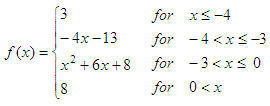 and we’d like to graph it on the domain of -8 ≤ x ≤ 4 Method 1. If-else statementsNotice that this is not the best way to do it in Matlab, but I mention the idea because this is the fundamental concept, and in some programming languages it cannot be done in a dfferent way. It's for study, not for real implementation... So, let's define our function with if-else statements for the moment. We just use different conditions for the different ranges, and assign appropriate values. function y =
piecewise1(x) Now, we can use scalars or arrays to call this function, in a classical way: %
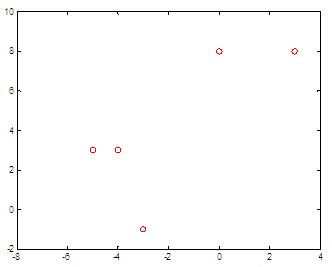
Define elements The result is:
Let’s say that we need more values. We can call our function this way x = -8 :
.01 : 4; The new graph (which obviously gives more information) is: 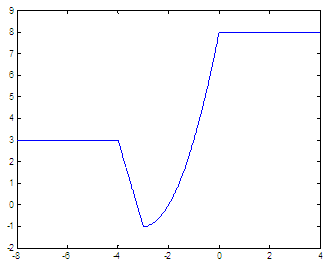 Method 2. Switch-case statementsOur second method
classifies the elements using switch-case statements.
We separate the different ranges in different cases. If that condition
is true,
then the switch-expression will match the case-expression, and the
appropriate
statement(s) will be executed. function y = piecewise2(x)
We can test our second
piecewise function definition, like
this: x
= -8 :
.01 : 4; and get the previous
shown graph, too. Method 3. Vectorized wayThe above routines assume
that we’re entering scalars as
input parameters. Now, we’ll assume that we’re submitting whole
vectors, and
we’ll handle indices for that. This video will show you how to do it without using loops. After the video, another example is given with full code. The line x2 = x(-4
< x & x <= -3); assigns to x2 the values
of vector x that meet the criteria
of -4 < x ≤ -3. The line y(-4 < x & x <= -3) = -4*x2 - 13; works
with the values in x2, calculates the appropriate function y(x) and
places the values in the correct indices of vector y. We can combine those two
ideas to work out all the appropriate
values for the whole function. The following code is just one way to take full vectors and pack them into piecewise functions:
%
second range %
third range %
fourth range Now, we can avoid
for-loops before graphing this type of
functions... x = -8 :
.01 : 4; this produces what we know and expect... From 'Piecewise Functions' to home From 'Piecewise Functions' to Flow Control
|