

Switch StatementAnother way to branch in programmingThe switch
statement in Matlab executes groups of instructions or
statements based
on the
value of a variable
or expression.
It's a type of selection control statement that exists in most modern imperative programming languages. The keywords case and otherwise delineate the groups. Only the first matching case is executed. There must always be an end to match the switch. 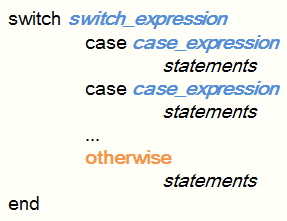 The syntax is: switch switch_expr case case_expr statement ... case {case_expr1,case_expr2,case_expr3,...} statement ... otherwise statement ... end MATLAB switch does not fall through. If the first case statement is true, the other case statements do not execute. So, break statements are not required. Example: To execute a certain block of code based on what the string 'color' is set to: color = 'rose'; switch lower(color) case {'red', 'light red', 'rose'} disp('color is red') case 'blue' disp('color is blue') case 'white' disp('color is white') otherwise disp('Unknown color.') end Matlab answer is: color is red Branches in Menus For - Statement While - Statement If - Statement From 'Switch statement' to home From 'Switch statement' to Matlab Flow Control Top
|

